


I was working on a Ax2012-to-D365 code migration recently. Because the model and layers in the 2012 code were a mess we merged all the 2012 code into one singular d365 model and made this compilable. During this we got rid of some 3rd party software called „Lasernet“ because it will be re-added as separate model to the solution later. After successfully compiling the migrated code and syncing we got errors:
Log level - Error | System.AggregateException: Log level - Error | System.AggregateException: One or more errors occurred. ---> Microsoft.Dynamics.AX.Metadata.MetadataCorruptedException: The field 'LACTransRefRecId' on the extension 'SalesConfirmDetailsTmp.XXXXXX' already exists. This extension cannot be applied to the base element.The issue is that some migrated code slipped though the code reviews and now we have the same fields added via our table extensions and lasernets package.
We now need to find all lasernet fields in our custom model that slipped through and remove them. We will use the XREF db for this. Whenever you compile code (FULL model build!) Visual Studio will write all elements and calls (in and outgoing) into ‚DYNAMICSXREFDB‘.
We search for:
* TableExtensions
* Fields in TableExtensions that start with ‚LAC‘
* Extension must be in XXXXXX-Model
This will result in the following query:
select * from DYNAMICSXREFDB.dbo.Names
where
	ModuleId = (select top 1 Id from Modules where Module = 'XXXXXX')
	and Path like 'TableExtension/%/TableField%/LAC%'
order by Path
And this is the output:
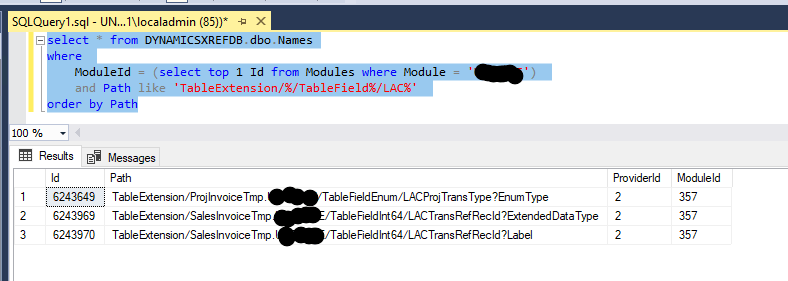
 Random code
Hinterlasse einen Kommentar